

It is tempting to want to work outdoors on a good sunny day out. However, that might be a significant challenge if you use a laptop whose screen isn’t bright enough to counter the sun glare. In this case, you might feel like you have bought a mirror rather than a computer. As a freelancer, writer, or creative, here’s a significant issue you might constantly battle.
In this post, I have compiled some of the best laptops for outdoor use and included a quick review and guide to help you make your decision. Aside from the essential features such as tiny bezels, durability, and resolution, these laptops have outstanding performance.
As a bonus, they are convenient to use in the sun due to their screen brightness ability to counter the sun’s glare. So, let’s discover the best laptops for outdoor use.
Note – Please know, some of the external links on this page are affiliate links, this means that if you purchase after following one, I make a small commission from the sale at no additional cost to yourself.
Top Picks
| Apple MacBook Pro | Dell XPS 13 9310 | |
|---|---|---|

|

| |
| Brand | Apple | Dell |
| Series | MacBook Pro | XPS 13 9310 |
| Color | Space Gray | Silver |
| Screen Size | 14.2 Inches | 13.4 Inches |
| Hard Disk Size | 1 TB | 512 GB |
| Processor | Up to 10-core CPU | Intel Core i7-1185G7 |
| Ram Memory | 16 GB | 16 GB |
| Operating System | Mac OS | Windows 10 Pro |
| Graphics Coprocessor | M1 Pro | Intel Iris Xe Graphics |
| Weight | 3.5 pounds | 2.80 lbs |
| Dimensions | 8.71 x 12.31 x 0.61 inches | 7.82 x 11.64 x 0.58 inches |
| Display Resolution | 3024 x 1964 pixels | 1920 x 1200 pixels |
| Lightweight | Yes | Yes |
| HD camera | Yes | Yes |
| View on Amazon | View on Amazon |
Features to look for in laptops with the best laptop screen for sunlight
Purchasing a computer for indoor use is significantly different from buying a laptop for outdoor use. Thus, when planning to buy a laptop for outdoor use, here are some features you should look out for in a product:
- Size
- Screen resolution
- Weight
- Battery life
- Durability
Product reviews
After thoroughly going through the several options of laptops that could be used outdoors, here are the top laptops for outdoor use.
1. Microsoft Surface Book 3

Microsoft Surface Book 3 is an upgrade to its predecessor, the Surface Book 2. The Surface Book 2 was excellent with a brilliant build, battery life, and an 8th Generation CPU.
However, the Microsoft Surface Book 3 boasts of a 10th Generation Intel chip no matter what configuration you buy. The device comes in two screen sizes, 13-inch and 15-inch. It features the Nvidia Quadro RTX 3000 GPU and a quad-core i7 processor, enhancing superior performance.
The Microsoft Surface Book 3 comes with a 15-inch display with a 3240 x 2160 resolution backed up with a 402 nit brightness, making it usable in bright conditions. The convertible 2-in-1 device is detachable and portable.
Although the device isn’t the lightest, it’s pretty mobile at 4.2 pounds of weight in the laptop mode and less in tablet mode.Thus, it is lightweight and convenient to carry for use outdoors.
The Surface Book 3 has an excellent design and features 16GB memory and 256GB SSD. It also comes with Bluetooth and 802.11ax for wireless connection. The common downside of this laptop is its shortage of ports; the Microsoft Surface Book 3 shares a USB Type-C port, 2 USB Type-A ports, and a full-size SD card slot.
Surface Book 3 also has a remarkable battery life of about 15 hours in a single charging, enough to last you outdoors for your normal activities.
The Surface Book 3 isn’t cheap. Thus, if you would love to save a few dollars, the Microsoft Surface Book 2 is an excellent alternative.

- Strong battery life.
- Comfortable keyboards
- Detachable 2-in-1 device
- Great display
- Excellent performance

- No in-built stylus
- Expensive
- Not exactly lightweight
NEW Microsoft Surface Book 3 - 15 inch Touch-Screen
Check the price on Amazon2. Apple MacBook Pro
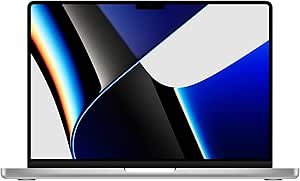
The Apple MacBook Pro comes in 14.2-inch and 16.2-inch sizes with powerful Apple silicon chips, the M1 Pro and M1 Max. The two chips have a 10-core CPU with eight high-performance and two high-efficiency cores.
The M1 Pro Chip in the 16-inch Apple MacBook Pro is excellent for all tasks with its featured 10-core CPU, 16-core GPU, 16GB of unified memory, and a storage of 512GB SSD. You could also pay extra to boost your memory to 32GB and space up to 8TB.
However, the M1 Max chip is more powerful with its 10-core CPU and a 32-core GPU. It also features 32GB of unified memory and a storage of 512GB SSD. You could also pay to upgrade your memory to 64GB and space up to 8TB SSD.
Still, regardless of the option you purchase, each has superior performance and will make your everyday tasks effortless.
If you need more power for more draining or heavy apps, you can go for the M1 Max chip, although it is more expensive. Otherwise, the M1 Pro chip will do for most content creators and general laptop users.
The MacBook Pro 16-inch features a Liquid Retina XDR display which, although it isn’t 4K, has a vibrant 3456 x 2234 resolution.Backed up with brightness that can go up to 1600 nits when watching HDR videos, 1000 nits of full-screen brightness, and SDR limited to 500 nits, the MacBook Pro is good outdoors.
The keyboard and touchpad are more functional and comfortable with the Apple touch bar ditched. Plus, the device has a built-in touch ID sensor on the top right key for biometric authentication.
The Apple MacBook Pro also offers a long-lasting battery suitable for outdoor use. With over 14 hours of use on a single charge and a fast-charging feature via MagSafe 3, you could do your tasks without worry.
The device also comes with an upgraded webcam 1080p FaceTime and multiple ports for data transfer. The MacBook Pro also features a great speaker system with good bass and clear vocals.
- It has 3 Thunderbolt 4 ports
- Strong battery life
- Great speakers
- It comes with an upgraded 1080p webcam
- Excellent performance and fast storage device
- No USB Type-A ports
- The display isn’t 4K
- Expensive
2021 Apple MacBook Pro (14-inch, Apple M1 Pro
Check the price on Amazon3. Dell XPS 13 9310
Dell has improved its XPS series over time, and the XPS 13 visibly screams of its improvements from the previous models. The Dell XPS 13 9310 is a powerful laptop with a compact design.
Backed up with 600 nits of brightness, which is more than Dell promised, the device is one of the best laptops for outdoor use. For the specifications of Dell XPS 13, the device features the 10th Generation Intel Core i7 processor.
Still, it gives you two other processor options, such as the Intel Core i3 and i5. Although only Core i5 and i7 come with the integrated Intel Iris XE, the core i3 relies on the Intel UHD Graphics. The 13.4-inch FHD 1920 x 1200 touch screen comes with a full HD display.
The Ultrabook’s performance is excellent, with a memory of 8GB to 32GB and storage capacity from 256GB to 2TB PCIe NVMe SSD. I love the 1080p IR webcam camera, which is more explicit and a considerable step up from the usual 720p. The Dell XPS 9310 13 also has a redesigned keyboard which is different from its old models.
The keypads feel very even and are larger, hence very easy to click. On the other hand, the trackpad is also brilliant; made from glass, it is smooth and doesn’t cause any errors. This Ultrabook has media ports, including 2 Thunderbolt 3 USB Type-C, a microSD card, and a headphone/ mic jack for data transfer.
Although I wished it had more, it also features WiFi 6 and Bluetooth 5.0 for wireless connectivity options. With 2.8 pounds, it’s a delight to use Dell XPS 13, an all-metal constructed device that features a quiet cooling system. This cooling system helps prevent your device from heat.
Dell XPS 13 has dual speakers with clear and loud audio. Yet, the best thing about this device is its battery. It gives a powerful performance and strong battery life of 10 hours on a single charge. Plus, it supports a stylus pen, making taking notes, drawing, or sketching an enjoyable process for creatives.
- Excellent display screen quality
- 1080p webcam
- Good dual speakers
- Swift performance
- Portable laptop
- Strong battery life
- Dell XPS 13 doesn’t have a lot of ports
- No dedicated graphics card
Dell XPS 13 9310 Touchscreen 13.4 inch FHD Thin and Light Laptop
Check the price on Amazon4. Samsung Galaxy Book Flex 13.3

The Samsung Galaxy Book Flex 13.3 is one of the most attractive devices on the list with its sleek blue color. Still, it doesn’t stop at that. The device has excellent specifications with two variants, a 13.3-inch and a 15.6-inch laptop screen with a memory of 8GB and 16GB, respectively, and a storage capacity of 512GB.
Its 13.3-inch screen gives an excellent viewing experience, with its QLED touchscreen features a 1920 x 1080 pixels resolution. Built with an aluminum chassis body that makes the Ultrabook durable and a slim 360° design, you can effortlessly change the laptop to a tablet.
In addition, you can use this device outdoors in the sun without difficulty due to its 600 nits screen brightness which brings about enough clarity in the sun. It features an excellent and fast 10th Generation Intel Core i7 processor that enhances an outstanding performance that’s fast enough to take you through your daily task without a hitch.
Although the laptop has an Intel UHD graphics integration, it is essential to note that it can’t handle the latest games. Still, it will do for some light games, internet surfing, and IT tasks. The backlit keyboard is also excellent if you are working late.
Samsung integrated this model with 8GB RAM and 512GB storage. Thus, a significant deal-breaker of this computer is its RAM. Yet, it’s an excellent choice if you do not carry out many heavy tasks on your device.
The device is light enough to be carried around at 2.56 pounds. The device also has a long-lasting battery life of over 15 hours, perfecting it for outdoor use. The sleek device shares several connection options. It has 2 USB 3.0 ports, 2 Thunderbolt 3 USB ports, 1 USB Type-C port, an HDMI port, and a UFS MicroSD card reader.
It also features a WiFi 6 and Bluetooth for wireless connections. Samsung went a step further by including a Bluetooth-enabled S Pen in the device, which creatives can actively use on the go.
- Lightweight laptop
- Strong battery life
- Durable device
- Adequate Storage of 512GB SSD
- Backlit keyboard
- It features an S Pen
- Insufficient memory of 8GB
- The device has limited configuration compared to competitions
Samsung Galaxy Book Flex 13.3 inch Laptop - QLED Display and Intel Core i7 Processor
Check the price on AmazonBuyer’s Guide & FAQs
What should you look out for in a laptop that you plan to use outdoors? Let’s see some essential features you must pay attention to before purchasing.
Laptop Screen Quality
A general rule you should put into effect when choosing a laptop for outdoor use is that the higher the screen brightness nit, the better. Nit is a standard used to measure illuminance, and general laptops have a typical 200-300 nits.
However, that’s inadequate for working outdoors. The minimum for outdoor use should be 350 nits. A screen panel finish and an anti glare display are vital. The glossy screen finish on laptops is brilliant for indoor use. It is very reflective and can be tricky to use outdoors.
Thus, a device with an anti glare coating that helps prevent reflection is more likely to have a matte screen finish. You could also consider investing in a portable monitor if your screen struggles.
Battery Life
Suppose you decide to work at the park, but you use a laptop with a battery that lasts for three hours. In that case, you would be disappointed because you won’t be able to get much work done. So, an outdoor laptop needs strong battery life.
The battery capacity of an outdoor laptop should not only last for a minimum of 8 hours while carrying out multiple tasks and running heavy programs. It should last even longer when doing lighter tasks, such as surfing the internet on your device.
Portability
Portability is one of the essential features to look out for before purchasing an outdoor laptop. You could buy a laptop weighing over 20 pounds and leave it sitting on your desk forever, no problem. But one that you use outdoors should be a portable laptop.
Size and weight play an enormous role in a portable laptop. Laptop screen sizes range from 11.6 to 17.3 inches so ensure you choose the right and compact size convenient for you to transport.
Plus, you should choose something lightweight. A 2-in-1 convertible laptop is also an excellent option because they are slim and high-performance devices.
Durability
A laptop used outdoors is at risk of scratch, spills, or weather exposure. Plus, there’s a lot of moving around of the device that may cause falls; hence, durable material is vital to keep your device safe when using it outside. Therefore, you must choose a device with rugged and high-quality materials that are durable enough to withstand weather conditions and other dangerous variables.
Memory
Memory and storage might not seem that important to you when considering your option for the best outdoor laptops to purchase, but it’s necessary. A laptop with a good memory will enable you to multitask and avoid slowdowns. It will also save your battery by getting more work done in time. In addition, surfing the internet would be faster with a higher RAM regardless of the network connection speed.

Tips for using the best laptop screen for sunlight
One of the best advantages of being a creative or working for oneself is working from anywhere. Still, while working outdoors might be something you love, you might frequently find yourself unable to due to your device. So let’s see some tips for using a laptop outdoors.
- Use a laptop with an anti glare coating to protect it from the sun’s reflection.
- Work under a shade to avoid sun glare if you do not use a laptop with an anti glare coating.
- Invest in cooling pads to prevent your laptop from overheating in hot temperatures.
- Avoid outfits with lighter colors like white because they reflect on the screen, unlike darker colors.
- Sit and face the sun to protect your laptop screen from facing direct sunlight.
- Work outdoors when the temperature is around 10° to 35° Celsius for a laptop that doesn’t have a solid cooling system to avoid overheating.

FAQs
How do I get rid of a sun reflection on my laptop?
There are tons of methods and tips to get rid of a sun reflection on your laptop, but you need to understand that this occurs because light strikes your screen and bounces off it. Hence, the best method to solve this issue is to adjust your viewing angles and keep your laptop screen away from direct sunlight.
You could also increase the brightness level until the sun cannot bounce off it or move under a shade to reduce the sun’s intensity.
Is 400 nits bright enough for outside?
Yes, it is. Most laptops with or without sun glare of around 400 to 700 nits are excellent to use outdoors. However, 1000 nits or more would be more suitable for viewing in direct sunlight.
Can I use my laptop in the sun without it overheating?
Old laptops are known to overheat when used in the sun, and here’s why many people worry about using their laptops in the sun. However, you can use modern laptops with efficient cooling systems in the sun without overheating. You could avoid placing your device under direct sunlight or purchase a laptop cooling pad as an extra precaution.
How many hours can a laptop be used continuously?
Generally, laptops can last from as low as 2 hours to as high as 10 hours. Hence, depending on your device’s battery life, it can last even longer.
Can I charge my laptop outside without my laptop charger?
If you use your laptop outdoors, you must purchase a laptop with solid battery life, such as those on the list. Yet, depending on your device type, you might be able to charge with other means, such as one of the device’s USB Type-C ports. You can also charge your laptop with a power bank.
Do an anti glare screen works outdoor?
Yes, they do. Laptop screens can become glossy like outdoors. Still, the anti glare screens have matte coatings that reduce the sun’s reflection against the screen. Thus, they are better suited to be used outdoors.
Final Thoughts
I have briefly mentioned the features for choosing suitable laptops for outdoor use. However, one of the most significant features of selecting a laptop to be used outdoors is its brightness nits. It enhances your ability to work without struggling to see the content on your screen. In addition, an outdoor laptop must have strong battery life and a slim yet durable design.If I were to recommend it, I would go with the Lenovo ThinkPad X1 Yoga. This is because of its good monetary value, strong battery life, high-performance processor, and sufficient 16GB memory. However, going for any other option on the list is also a great decision.